Sublimation Mouse Pads: 7 Essential Tips
Creating professional Sublimation Mouse Pads is one of the easiest ways to produce high-quality promotional products, personalized gifts, and branded office accessories. However, achieving vibrant colors and crisp images requires more than simply pressing a design onto a blank mouse pad.
Common issues such as faded colors, blurry graphics, uneven pressure, or incorrect temperature settings can affect the finished product. Fortunately, these problems are easy to prevent with the right preparation and printing techniques.
In this guide, you’ll learn seven essential tips that will help you improve print quality, reduce production errors, and create mouse pads your customers will love. Whether you’re new to sublimation or looking to refine your workflow, these proven practices will help you produce consistent, professional results every time.
Choose High Quality Sublimation Mouse Pads
Not every blank mouse pad is designed for sublimation.
Choose products that feature:
- A bright white polyester fabric surface
- Firm rubber backing
- Smooth, even coating
- Consistent thickness
Premium blanks produce sharper details and richer colors while resisting peeling and edge lifting.
Higher-quality blanks also improve customer satisfaction and reduce waste.
Prepare Artwork for Sublimation Mouse Pads
Proper artwork preparation is just as important as the printing process.
For the best results:
- Design at 300 DPI
- Use RGB color mode when recommended by your workflow
- Export high-quality PNG or PDF files
- Remove unwanted backgrounds
- Size artwork to the exact mouse pad dimensions
Sharp artwork produces noticeably cleaner transfers.
Use the Correct Heat Press Settings
Every sublimation blank has recommended settings.
Most Sublimation Mouse Pads perform well around:
- Temperature: 385°F–400°F
- Time: 45–60 seconds
- Pressure: Medium
Always verify the manufacturer’s recommendations before production.
Too much heat can dull colors, while insufficient heat may create faded images.
Prevent Ghosting During Pressing
Ghosting happens when the transfer paper shifts during pressing.
To reduce movement:
- Secure artwork with heat-resistant tape.
- Close the press smoothly.
- Avoid lifting the press too quickly.
- Remove the transfer paper carefully after pressing.
Even slight movement can create blurry outlines around text and graphics.
Achieve More Vibrant Colors
One goal of every sublimation printer is producing bold, vibrant colors.
To improve color output:
- Use high-quality sublimation ink.
- Replace aging ink when necessary.
- Keep print heads clean.
- Use ICC color profiles.
- Store paper in a dry environment.
Color consistency becomes much easier when your equipment is properly maintained.
Protect Your Sublimation Supplies
Environmental conditions affect printing quality.
Store your supplies:
- Away from direct sunlight
- In a cool, dry location
- Inside sealed packaging when possible
- Away from excessive humidity
Proper storage helps preserve ink performance, transfer paper, and blank products.
Inspect Every Mouse Pad Before Delivery
Before packaging, inspect every finished product.
Check for:
- Full color coverage
- Sharp image details
- Straight alignment
- Clean edges
- Surface defects
- Proper adhesion
Taking a few extra seconds for quality control helps prevent costly remakes and improves customer satisfaction.
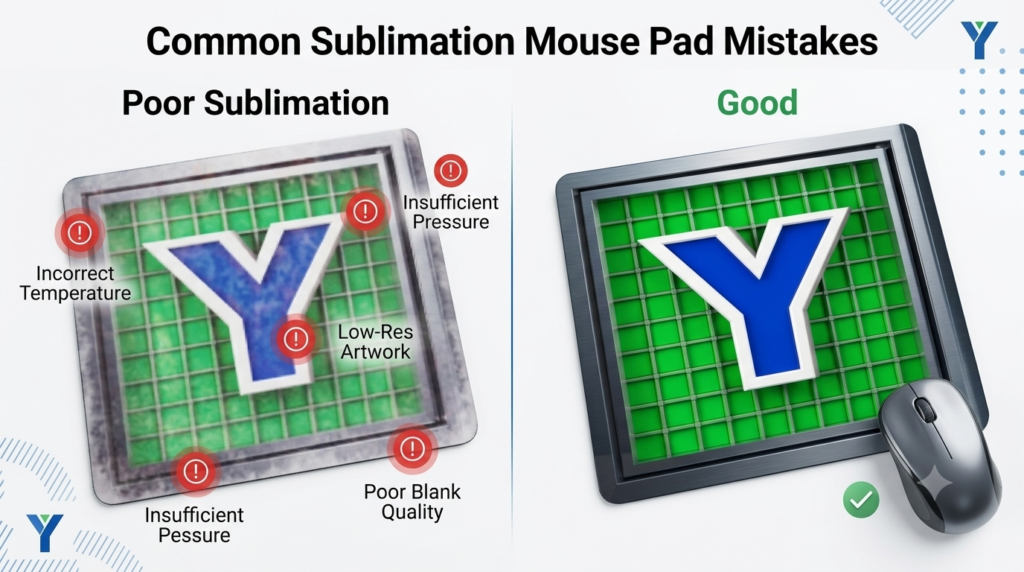
Common Mistakes to Avoid
Even experienced printers occasionally encounter issues.
Avoid these common mistakes:
Using Low Resolution Images
Blurry artwork leads to blurry prints.
Incorrect Heat Settings
Too much or too little heat affects color quality.
Uneven Pressure
Uneven pressure creates inconsistent transfers.
Moisture in the Blank
Pre-pressing removes moisture that can affect image quality.
Cheap Blank Products
Inferior blanks rarely produce premium results.
Avoiding these mistakes will improve efficiency and reduce wasted materials.
Continue Exploring Y Printing Resources
If you’re expanding your custom printing business, consider exploring additional resources from Y Printing.
Our Custom Printing Solutions showcase personalized products for businesses, schools, and events. If you’re interested in apparel decoration, our DTF Transfers provide ready-to-press graphics with vibrant color and excellent durability.
You can also learn more about selecting the right materials through our DTF Film Products, explore best practices in our DTF Ink Guide, and discover how adhesive powders contribute to long-lasting prints in our Polyamide Powder Guide.
To learn more about our commitment to quality products and customer service, visit our About Us page.
Industry References
For additional sublimation education, explore these trusted industry resources:
Producing professional Sublimation Mouse Pads doesn’t require complicated equipment—it requires consistent techniques. By choosing quality blanks, preparing artwork correctly, using proper heat press settings, preventing ghosting, and inspecting every finished product, you can consistently create vibrant, durable products your customers will appreciate.
At Y Printing, we’re committed to helping businesses, creators, and print professionals improve their workflow with dependable products, practical resources, and expert guidance. Master these seven essential tips, and you’ll be well on your way to creating mouse pads that look professional and stand the test of time.
Frequently Asked Questions
What temperature should I use for sublimation mouse pads?
Most manufacturers recommend between 385°F and 400°F with medium pressure for approximately 45–60 seconds.
Why do my sublimation mouse pads look faded?
Faded prints are commonly caused by incorrect heat settings, poor-quality blanks, outdated ink, or improper color management.
Can I sublimate onto any mouse pad?
No. Only mouse pads with a polyester-coated fabric surface are suitable for sublimation printing.
Should I pre-press mouse pads?
Yes. A short pre-press removes moisture and helps produce cleaner, more vibrant transfers.
How long do sublimated mouse pads last?
With quality materials and proper care, sublimated mouse pads maintain their vibrant appearance through years of regular use.